Friday, April 12, 2013

Disruptive technology

App phone era touch screen , speakers, wifi, cellular, Bluetooth. The phone is obsolete. Kids talk less on the phone now. They don't email or watch tv. Kids can even make the phone into a music instrument! Called the ocarina and students can listen to others all over earth playing the phone. The phone, tablet, iPod etc has passed into becoming a tool not just entertainment.

Cultural ramifications of the iPhone? Augmented reality. Overlaying what is around you artistically, educationally and amusement. Look at word lens app for language classes. Changes Spanish to English by using the camera or reverses it. No it is not a joke app and can be very useful.

Web 2.0 what is it?
Facebook 2nd most used Web 2.0 after Google. Craigslist is being said to put newspapers out of business. They are not getting money for adds, more adds are posted at Craigslist and now most people check it first. Wikipedia has been found to be very accurate due to group editing things that are inaccurate are corrected quickly. Purpose of Web 2.0 connect people together with likes or searches.

How does this affect the next generation? Everything is real time now they don't talk on the phone as much, they use APPS. TV isn't as big kids watch on their devices Hulu and Netflix, while doing other things. Privacy is not as a much of an issue with kids why? They are the ego generation they like to talk about themselves, post a video, and tell everyone everything. Looking at funny things are what this generation and up to the 30's want it.

What do we need to teach? Permanence of the Internet things will be their later in life. Employers will check into you. Credibility is important check your facts and cite information. Teach what is private and what can be posted. They really don't know. It is the educators job to educate and keep up to date with the generation you are teaching and have fun doing it.


Tuesday, January 29, 2013

Using technology in the art room: ipad , ipod and android laptops


During this week  I decided to do art centers and have technology play a part.  I really wanted to give the students time to “play” with a variety of apps they see on the ipod/ipad or laptop and ask about. This way when I do a lesson and use that app or program later they are familiar with it. This technique can be used with other curriculum apps as well.

IMG_2243[1]

App Screenshots

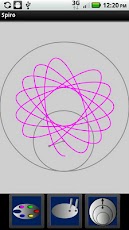
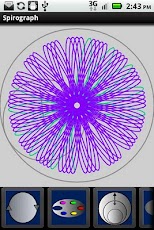
Spirograph drawing one center had android laptop with the Spirograph app installed. Students would create a hand drawn Spirograph drawing and then try to recreate using the app.


IMG_2234[1] Photography student created a drawing using colored pencil on a 3 by 4 index card. Then they could choose from a variety of camera apps allowing them to change the picture digitally. Apps they used Cam Wow, WordFoto,Make Cubist, and Fracture.

ipad stop motion cameraStudents using the Stop Motion camera app with the ipad mini to create a clay stop motion video. We just had coils of clay slinky along.

Friday, June 8, 2012

Art ideas
website:SPS art Room
Tech ideas from ipad/ipod to great art education ideas: Diocese of Harrisburg art teacher tech spot

Saturday, November 12, 2011

EdCamp Harrisburg: Great Day


Great day at EdCamp Harrisburg I highly recommend if you get a chance to go to one of type of Camps, try it.

http://edcampharrisburg.org/

Some of the things I learned and liked

Lino It - http://en.linoit.com/

An online “sticky” board; includes iPhone app; no

email needed to participate; great for

discussions/asking questions; great for sharing

resources, links, etc.

BCIUiPad -

http://bciuipad.wikispaces.com

An iPad site that includes links to subject-area

content designed for the iPad

Arted20 -
http://arted20.ning.com/


Similar set up like facebook but for art educators

TED -
http://www.ted.com/

Motivational videos

Of course the few I have mentioned and used a time or two www.artsonia.com  and  www.animoto.com

Great video: Ok not appropriate for in class use, maybe high school, depending on your students but great ideas for creating a living painting as a resource for you. A project I have been thinking about doing every year but just have not got motivated to do yet. One of the college art teachers, Terry Yacovelli, showed this this video. My favorite I may have my students do is the sunflower have a group design flowers and groups create the background??


Monday, September 12, 2011

Edcamp Harrisburg

http://edcampharrisburg.org/ Never went to a edcamp, have been to the barcamp Harrisburg on technology so I am excited and hoping this is just as good it's free so sign up and go

Friday, September 2, 2011

  Watercolor tip: If you do not want you students to use a specific color on a watercolor strip place a piece of masking tape over the color.

Thursday, August 25, 2011

Why hide technology in the Locker??

I have been following the trend of schools allowing and actually encouraging students to bring and use smart phones in school.  It is becoming common in the work field as a tool so why not allow middle school and high school students use this technology in the classroom. Heck, with education budget cuts this could actually become a free resource.  How many free or low cost educational apps are available on the iphone.  How many students have these devices in lockers, book bags or maybe at home. Why not instead of telling students to leave them at home, take them away when they have them out we as teachers teach them how to responsibly use them. They are not going away. 

I went two years ago to a workshop that  one teacher discussed was how the  inner city school teacher who “gasp” allowed students to use their smart phones. She set up rules:
1.  place them on airplane mode unless an app needs the 3g or wireless.
2. She could answer it if it rang and no texting while in class.
3.  IF Caught misusing the phone they would loose use of the phone in class for the week . No using it for research, games or  projects, like a normal classroom. They got the textbook, pencil and notebook. She had the students write on a large paper what misuse would be. (Oh an internet safety lesson)    Examples: no camera use unless for project.  She taught about professional uses of facebook and twitter.  A computer ethics course.
She also allowed students to text or e-mail home work.  During the year she documented an increase in test score and turned in homework.  As for misuse she had non students did not want to loss the privilege and respected the rules they created.

I researched a few article and successful schools that are allowing smart phone use
Very Recent Article:

Schools starting to allow use of digital devices

Some schools rethink ban of cell phones Best advice I have read
But the American Association of School Administrators itself argues the other side, promoting the use of cell phones in class as “genuine educational tools.”
“Handheld devices like cell phones, iPhones, BlackBerrys and iTouch are beginning to offer applications that enhance classroom learning by engaging kids to use tools they are constantly using anyway,” Daniel A. Domenech, the association’s executive director, wrote in an essay last fall.
Cell phones head to classThe students are expecting immediate answers and, if we don't always have a room full of computers and they do have answers right there in their pockets, it's sad for us to say, ‘I know it's there and you can't (use it),'” Faulkner said. “Some teachers were saying, ‘OK, you can look that up on your phone and I'll stand right here and watch you.'”
 

School Districts Lay Foundation for Mobile Devices

Over the past two years, Forsyth County Schools in Cumming, Ga., has slowly allowed some of its 34,000 students to bring their own notebooks, iPhones or other computing tools to school and connect them to the district network.
This after reading numerous articles has to be the best use of available technology I have read about. If you allow students to link with WIFI not the cellular network you can monitor what they can and cannot use. That is what I use in my classroom. I have iphones and ipods using WIFI only and I know the students are only able to get to appropriate sites. Have the student remove the sim card and place it a container labeled with their name if your worried about them usng the cellular network at the end of the day they can put the sim card back in. In my classroom they are old phones that does not have a sim card.